Task Queue Priority and Fairness
Task Queue Priority and Task Queue Fairness are two ways to manage the distribution of work within a Task Queue. Priority allows Tasks to be executed in Priority order. Fairness prevents one set of Tasks from blocking others within the same priority level.
You can use Priority and Fairness individually or combine them to express Fairness within a Priority level.
Task Queue Priority
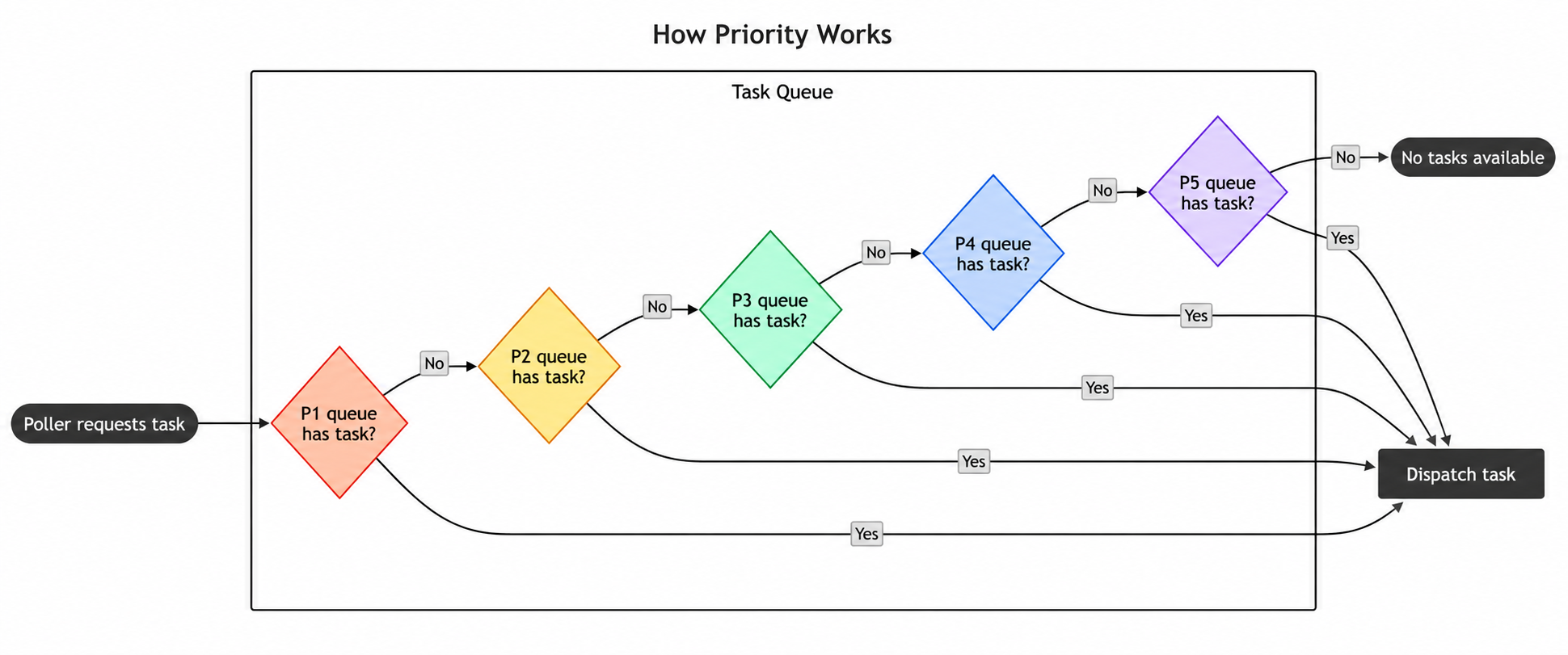
Task Queue Priority lets you control the execution order of Workflows, Activities, and Child Workflows based on assigned priority values within a Task Queue. Each priority level acts as a sub-queue that separates Tasks so that high priority Tasks can cut in front of low priority Tasks.
When to use Priority
If you need a way to specify the order your Tasks execute in, you can use Priority to manage that. Priority lets you differentiate between your Tasks, like batch and real-time Tasks, so that you can use a single pool of Workers for efficient resource allocation, while ensuring real-time Tasks are processed ahead of batch Tasks.
You can also use this as a way to run urgent Tasks immediately and override others. For example, if you are running an e-commerce platform, you may want to process payment related Tasks before less time-sensitive Tasks like internal inventory management.
How to use Priority
Priority is enabled by default in both Temporal Cloud and self-hosted Temporal. To disable Priority in self-hosted Temporal, set the dynamic config matching.useNewMatcher to false on a Task Queue, Namespace, or globally.
To use Priority, you need to set a priority key at the Workflow, Activity, or Child Workflow level to a value within the integer range [1,5].
A lower value implies higher priority, so 1 is the highest priority level. If you don't specify a Priority, a Task defaults to a
Priority of 3. Activities and Child Workflows will inherit their Workflow's priority unless they explicitly specify
their own priority.
When Priority is enabled, all Tasks within a Task Queue will be processed in Priority order. For example, all priority level 1 Tasks will execute before the first priority level 2 Task, and so on. Lower priority Tasks will be blocked until all higher priority Tasks finish running. Tasks are scheduled by default to run in first-in-first-out (FIFO) order within each priority level. If you need greater control of task ordering within a priority level, such as preventing large tenants from overwhelming small tenants, check out the Fairness section.
You can set a Workflow's priority key via the CLI like so:
temporal workflow start \
  --type ChargeCustomer \
  --task-queue my-task-queue \
  --workflow-id my-workflow-id \
  --input '{"customerId":"12345"}' \
  --priority-key 1
You can set priority keys for a Workflow within the SDK like so:
workflowOptions := client.StartWorkflowOptions{
  ID:        "my-workflow-id",
  TaskQueue: "my-task-queue",
  Priority:  temporal.Priority{PriorityKey: 5},
}
we, err := c.ExecuteWorkflow(context.Background(), workflowOptions, MyWorkflow)
WorkflowOptions options = WorkflowOptions.newBuilder()
  .setTaskQueue("my-task-queue")
  .setPriority(Priority.newBuilder().setPriorityKey(5).build())
  .build();

WorkflowClient client = WorkflowClient.newInstance(service); MyWorkflow workflow =
client.newWorkflowStub(MyWorkflow.class, options); workflow.run();
await client.start_workflow(
  MyWorkflow.run,
  args="hello",
  id="my-workflow-id",
  task_queue="my-task-queue",
  priority=Priority(priority_key=1),
)
var handle = await Client.StartWorkflowAsync(
  (MyWorkflow wf) => wf.RunAsync("hello"),
  new StartWorkflowOptions(
    id: "my-workflow-id",
    taskQueue: "my-task-queue"
  )
  {
    Priority = new Priority(1),
  }
);
You can set priority keys for an Activity within the SDK like so:
ao := workflow.ActivityOptions{
  StartToCloseTimeout: time.Minute,
  Priority:            temporal.Priority{PriorityKey: 3},
}
ctx := workflow.WithActivityOptions(ctx, ao)
err := workflow.ExecuteActivity(ctx, MyActivity).Get(ctx, nil)
ActivityOptions options = ActivityOptions.newBuilder()
  .setStartToCloseTimeout(Duration.ofMinutes(1))
  .setPriority(Priority.newBuilder().setPriorityKey(3).build())
  .build();

MyActivity activity = Workflow.newActivityStub(MyActivity.class, options); activity.perform();
await workflow.execute_activity(
  say_hello,
  "hi",
  priority=Priority(priority_key=3),
  start_to_close_timeout=timedelta(seconds=5),
)
await Workflow.ExecuteActivityAsync(
  () => SayHello("hi"),
    new()
    {
      StartToCloseTimeout = TimeSpan.FromSeconds(5),
      Priority = new(3),
    }
  );
You can set priority keys for a Child Workflow within the SDK like so:
cwo := workflow.ChildWorkflowOptions{
  WorkflowID: "child-workflow-id",
  TaskQueue:  "child-task-queue",
  Priority:   temporal.Priority{PriorityKey: 1},
}
ctx := workflow.WithChildOptions(ctx, cwo)
err := workflow.ExecuteChildWorkflow(ctx, MyChildWorkflow).Get(ctx, nil)
ChildWorkflowOptions childOptions = ChildWorkflowOptions.newBuilder()
  .setTaskQueue("child-task-queue")
  .setWorkflowId("child-workflow-id")
  .setPriority(Priority.newBuilder().setPriorityKey(1).build())
  .build();

MyChildWorkflow child = Workflow.newChildWorkflowStub(MyChildWorkflow.class, childOptions); child.run();
await workflow.execute_child_workflow(
  MyChildWorkflow.run,
  args="hello child",
  priority=Priority(priority_key=1),
)
await Workflow.ExecuteChildWorkflowAsync(
  (MyChildWorkflow wf) => wf.RunAsync("hello child"),
  new() { Priority = new(1) }
);
Task Queue Fairness
Task Queue Fairness lets you distribute Tasks based on fairness keys and fairness weights within a Task Queue.
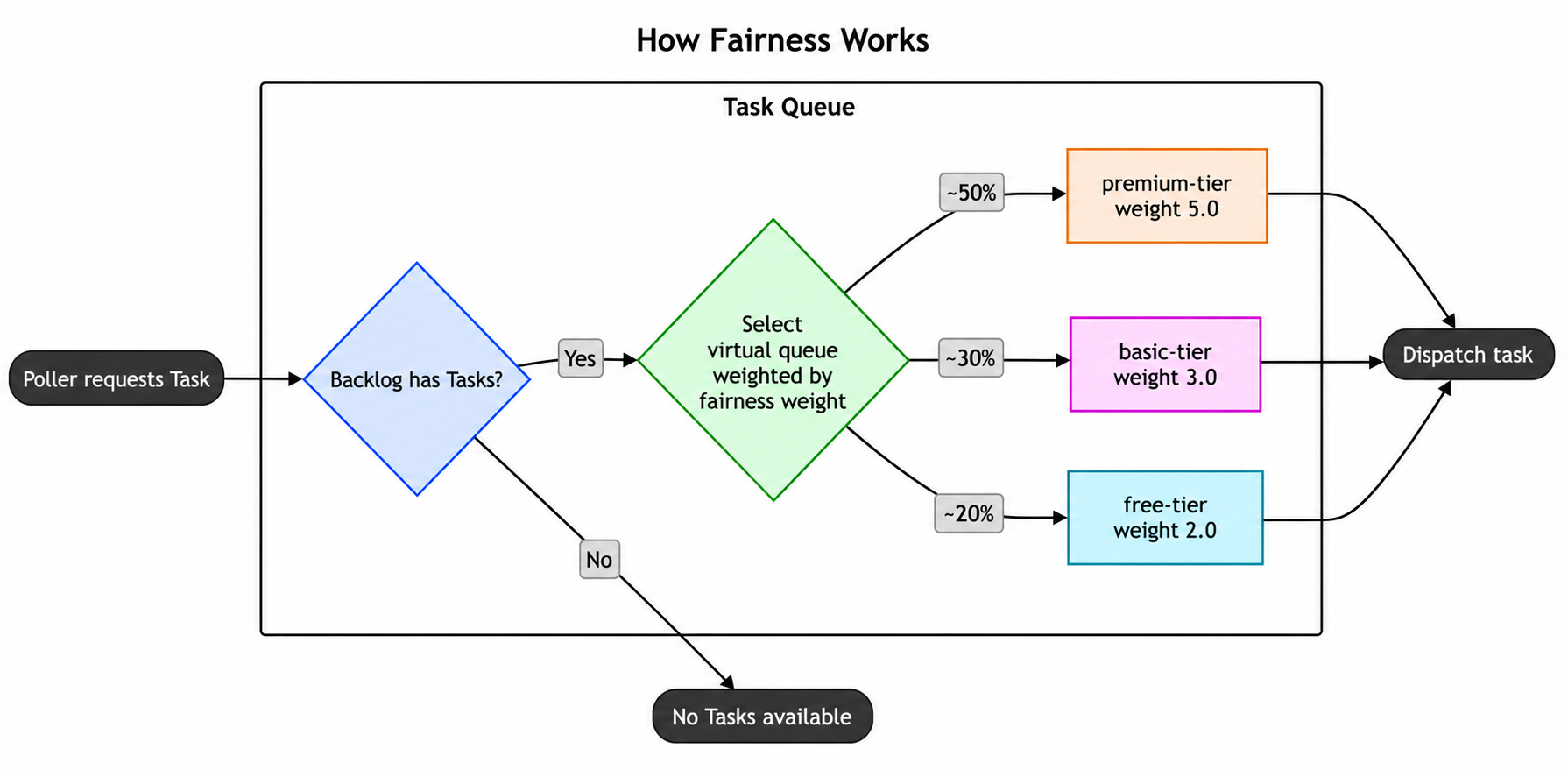
Each fairness key creates its own "virtual queue", allowing you to organize Tasks into logical groups like tenants, applications, or workload types. These virtual queues operate using a round-robin dispatch mechanism, meaning the system cycles through each fairness key in turn when selecting the next Task to dispatch. This prevents any single fairness key from hogging Worker capacity, even if one key has a much larger backlog than the others.
By default, each fairness key is weighted equally in the round-robin, with a fairness weight of 1.0. This behavior can be customized by assigning a different fairness weight to a key. For example, Tasks belonging to a fairness key with a weight of 2.0 will be dispatched twice as often as keys with the default weight.
When to use Fairness
Fairness is intended to address common situations like:
- Multi-tenant applications with big and small tenants where small tenants shouldn't be blocked by big ones.
- Assigning Tasks to different capacity bands and then, for example, dispatching 80% from one band and 20% from another without limiting overall capacity when one band is empty.
It sequences Tasks in the Task Queue probabilistically using a weighted distribution based on:
- Fairness weights you set
- The current backlog of Tasks
- A data structure that tracks how you've distributed Tasks for different fairness keys
As an example, imagine a workload with three tenants, tenant-big, tenant-mid, tenant-small, that have varying numbers of Tasks at all times. Your tenant-big has a large number of Tasks that can overwhelm your Task Queue and prevent tenant-mid and tenant-small from running their Tasks. With Fairness, you can give each tenant a different fairness key to make sure tenant-big doesn't use all of the Task Queue resources and block the others. In this case, tenant-mid and tenant-small will have Tasks run in between tenant-big Tasks so that they are executed "fairly".
How to use Fairness
Fairness is available for both self-hosted Temporal instances and Temporal Cloud.
To enable Fairness for a Namespace in Temporal Cloud, navigate to the Namespace's Overview page in the UI and activate the Fairness toggle. Note that Fairness is a paid feature in Temporal Cloud. For more information, see Fairness pricing.
If you're self-hosting Temporal, set matching.enableFairness to true in the dynamic config on the relevant Task Queues or Namespaces.
To use Fairness, you need to set fairness keys and optionally fairness weights at the Workflow, Activity, or Child Workflow level. Tasks with different fairness keys are dispatched in proportion to their fairness weights. For example, if you weight premium-tier at 5.0, basic-tier at 3.0, and free-tier at 2.0, then 50% of dispatched Tasks come from premium-tier, 30% from basic-tier, and 20% from free-tier. If there are Tasks in the Task Queue backlog that have the same fairness key, then they're dispatched in FIFO order.
You can set a Workflow's fairness key and weight via the CLI like so:
temporal workflow start \
  --type ChargeCustomer \
  --task-queue my-task-queue \
  --workflow-id my-workflow-id \
  --input '{"customerId":"12345"}' \
  --priority-key 1 \
  --fairness-key a-key \
  --fairness-weight 3.14
You can set fairness keys and weights for a Workflow within the SDK like so:
workflowOptions := client.StartWorkflowOptions{
  ID:        "my-workflow-id",
  TaskQueue: "my-task-queue",
  Priority:  temporal.Priority{
    PriorityKey:    1,
    FairnessKey:    "a-key",
    FairnessWeight: 3.14,
  },
}
we, err := c.ExecuteWorkflow(context.Background(), workflowOptions, MyWorkflow)
WorkflowOptions options = WorkflowOptions.newBuilder()
  .setTaskQueue("my-task-queue")
  .setPriority(Priority.newBuilder().setPriorityKey(5).setFairnessKey("a-key").setFairnessWeight(3.14).build())
  .build();
WorkflowClient client = WorkflowClient.newInstance(service);
MyWorkflow workflow = client.newWorkflowStub(MyWorkflow.class, options);
workflow.run();
await client.start_workflow(
  MyWorkflow.run,
  args="hello",
  id="my-workflow-id",
  task_queue="my-task-queue",
  priority=Priority(priority_key=3, fairness_key="a-key", fairness_weight=3.14),
)
const handle = await startWorkflow(workflows.priorityWorkflow, {
  args: [false, 1],
  priority: { priorityKey: 3, fairnessKey: 'a-key', fairnessWeight: 3.14 },
});
var handle = await Client.StartWorkflowAsync(
  (MyWorkflow wf) => wf.RunAsync("hello"),
  new StartWorkflowOptions(
    id: "my-workflow-id",
    taskQueue: "my-task-queue"
  )
  {
    Priority = new Priority(
      priorityKey: 3,
      fairnessKey: "a-key",
      fairnessWeight: 3.14
    )
  }
);
client.start_workflow(
  MyWorkflow, "input-arg",
  id: "my-workflow-id",
  task_queue: "my-task-queue",
  priority: Temporalio::Priority.new(
    priority_key: 3,
    fairness_key: "a-key",
    fairness_weight: 3.14
  )
)
You can set fairness keys and weights for an Activity within the SDK like so:
ao := workflow.ActivityOptions{
    StartToCloseTimeout: time.Minute,
    Priority: temporal.Priority{
    PriorityKey: 1,
    FairnessKey: "a-key",
    FairnessWeight: 3.14,
  },
}
ctx := workflow.WithActivityOptions(ctx, ao)
err := workflow.ExecuteActivity(ctx, MyActivity).Get(ctx, nil)
ActivityOptions options = ActivityOptions.newBuilder()
  .setStartToCloseTimeout(Duration.ofMinutes(1))
  .setPriority(Priority.newBuilder().setPriorityKey(3).setFairnessKey("a-key").setFairnessWeight(3.14).build())
  .build();
MyActivity activity = Workflow.newActivityStub(MyActivity.class, options);
activity.perform();
await workflow.execute_activity(
  say_hello,
  "hi",
  priority=Priority(priority_key=3, fairness_key="a-key", fairness_weight=3.14),
  start_to_close_timeout=timedelta(seconds=5),
)
const handle = await startWorkflow(workflows.priorityWorkflow, {
  args: [false, 1],
  priority: { priorityKey: 3, fairnessKey: 'a-key', fairnessWeight: 3.14 },
});
var handle = await Client.StartWorkflowAsync(
  (MyWorkflow wf) => wf.RunAsync("hello"),
  new StartWorkflowOptions(
    id: "my-workflow-id",
    taskQueue: "my-task-queue"
  )
  {
    Priority = new Priority(
      priorityKey: 3,
      fairnessKey: "a-key",
      fairnessWeight: 3.14
    )
  }
);
client.start_activity(
  MyActivity, "input-arg",
  id: "my-workflow-id",
  task_queue: "my-task-queue",
  priority: Temporalio::Priority.new(
    priority_key: 3,
    fairness_key: "a-key",
    fairness_weight: 3.14
  )
)
You can set fairness keys and weights for a Child Workflow within the SDK like so:
cwo := workflow.ChildWorkflowOptions{
  WorkflowID: "child-workflow-id",
  TaskQueue:  "child-task-queue",
  Priority:   temporal.Priority{
    PriorityKey:    1,
    FairnessKey:    "a-key",
    FairnessWeight: 3.14,
  },
}
ctx := workflow.WithChildOptions(ctx, cwo)
err := workflow.ExecuteChildWorkflow(ctx, MyChildWorkflow).Get(ctx, nil)
ChildWorkflowOptions childOptions = ChildWorkflowOptions.newBuilder()
  .setTaskQueue("child-task-queue")
  .setWorkflowId("child-workflow-id")
  .setPriority(Priority.newBuilder().setPriorityKey(1).setFairnessKey("a-key").setFairnessWeight(3.14).build())
  .build();
MyChildWorkflow child = Workflow.newChildWorkflowStub(MyChildWorkflow.class, childOptions);
child.run();
await workflow.execute_child_workflow(
  MyChildWorkflow.run,
  args="hello child",
  priority=Priority(priority_key=3, fairness_key="a-key", fairness_weight=3.14),
)
const handle = await startChildWorkflow(workflows.priorityWorkflow, {
  args: [false, 1],
  priority: { priorityKey: 3, fairnessKey: 'a-key', fairnessWeight: 3.14 },
});
var handle = await Client.StartWorkflowAsync(
  (MyWorkflow wf) => wf.RunAsync("hello"),
  new StartWorkflowOptions(
    id: "my-workflow-id",
    taskQueue: "my-task-queue"
  )
  {
    Priority = new Priority(
      priorityKey: 3,
      fairnessKey: "a-key",
      fairnessWeight: 3.14
    )
  }
);
client.start_child_workflow(
  MyChildWorkflow, "input-arg",
  id: "my-child-workflow-id",
  task_queue: "my-task-queue",
  priority: Temporalio::Priority.new(
    priority_key: 3,
    fairness_key: "a-key",
    fairness_weight: 3.14
  )
)
Tasks that do not have a fairness_key set are grouped together under an implicit empty-string key. All unkeyed Tasks share this single default bucket and participate in the same round-robin dispatch alongside named fairness keys, with a default weight of 1.0. This means Fairness adoption can be incremental: you can assign fairness keys to some tenants but not others. Unkeyed Tasks do not bypass Fairness; they compete as one group alongside all explicitly keyed Tasks.
There should only be one fairness weight assigned to each fairness key within a Task Queue. Having multiple fairness weights on a fairness key will result in unspecific behavior.
Using Priority and Fairness together
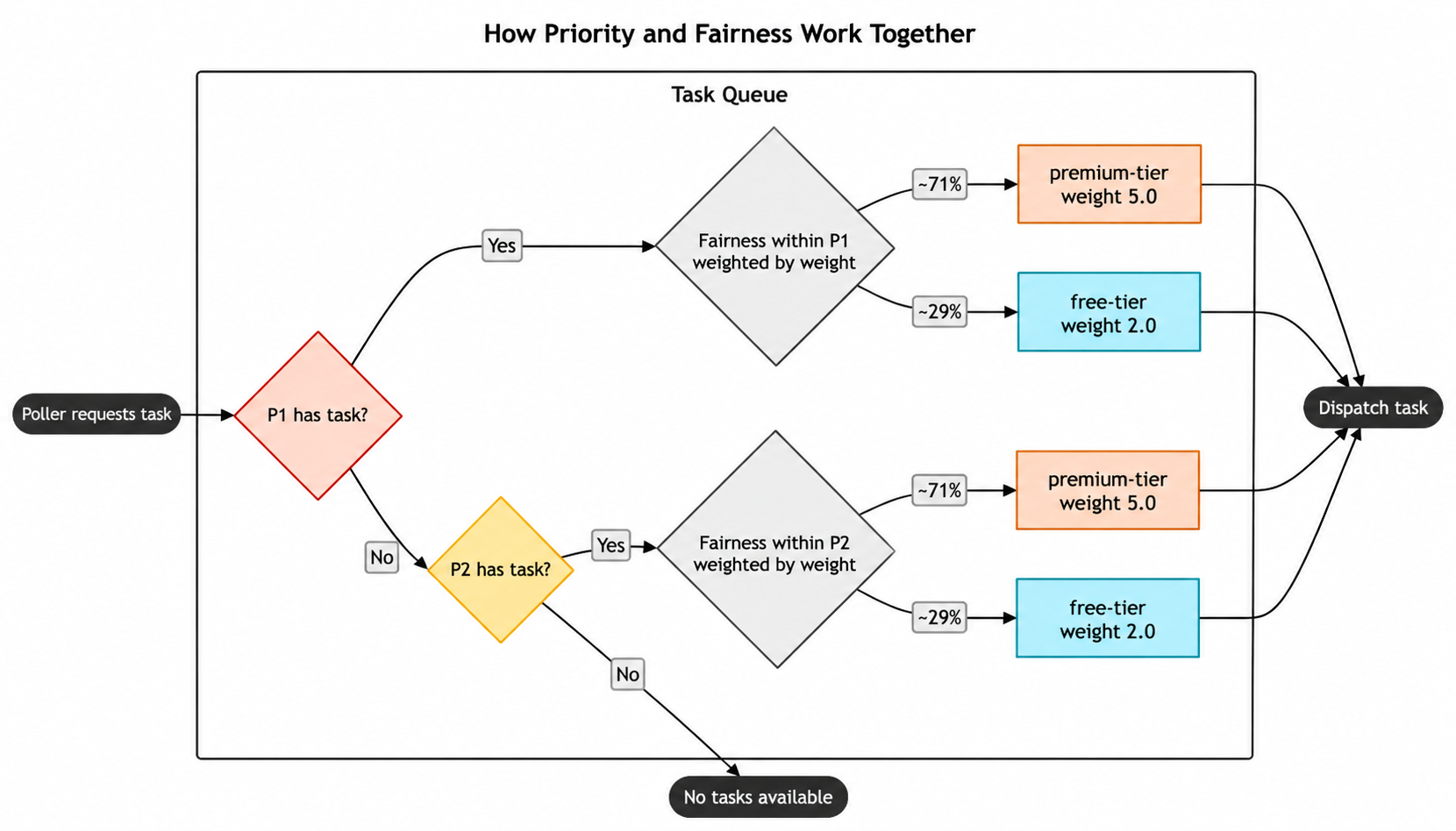
When you use Priority and Fairness together, Priority determines which "sub-queue" Tasks go into, and Fairness determines the order in which Tasks within each priority level are executed.
Inheritance
Each field of Priority (priority_key, fairness_key, fairness_weight) is resolved independently.
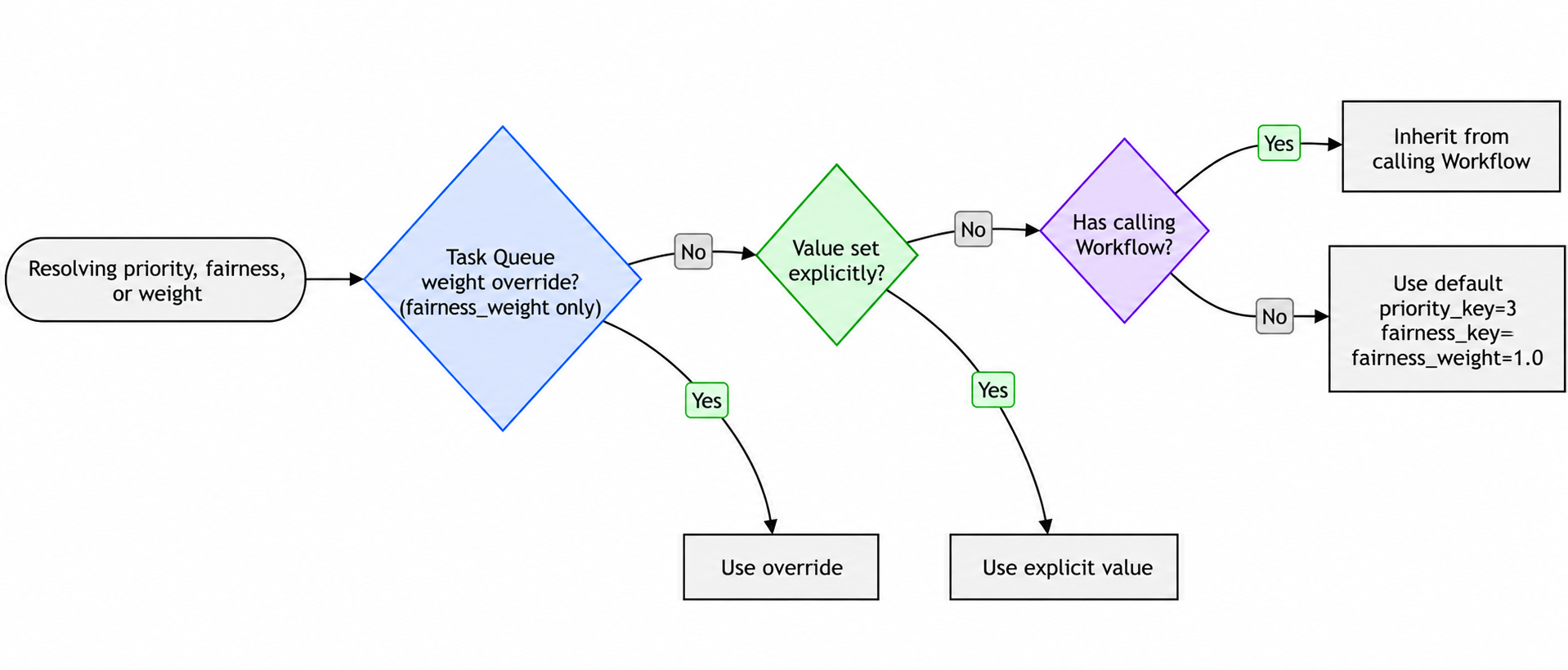
Activity inheritance order (highest precedence first):
- Fairness weight overrides on the Task Queue (
fairness_weightonly) - Value set explicitly in the Activity options
- Inherited from the calling Workflow
- Default value (
priority_key=3,fairness_key="",fairness_weight=1.0)
Workflow inheritance order (highest precedence first):
- Fairness weight overrides on the Task Queue (
fairness_weightonly) - Value set explicitly in the Workflow start options
- Inherited from the parent Workflow (Child Workflows only)
- Default value (
priority_key=3,fairness_key="",fairness_weight=1.0)
Continue-As-New inherits from the current execution unless explicit values are passed.
Enabling or disabling Fairness with an active backlog
When Fairness is enabled on a Namespace, Task Queues in the Namespace begin honoring fairness keys on Tasks for dispatch ordering. Existing queued Tasks are dispatched first, in their original priority + FIFO order. Fairness keys on Tasks already in the backlog do not retroactively affect their dispatch order.
When Fairness is disabled on a Namespace, Task Queues in the Namespace stop honoring fairness keys for dispatch ordering. The existing fairness-ordered backlog is dispatched first, in its original fairness order. After the backlog drains, Task Queues dispatch in priority + FIFO order.
In both directions, the existing backlog is dispatched before any new Tasks queued under the new mode. New Tasks dispatch only after the backlog fully drains. Tasks are not lost in either transition.
Set rate limits at the Task Queue level
When you're starting to scale your Temporal Services, you may decide to set Requests Per Second (RPS) limits to test your workload or experiment with provisioning benchmarks. You can set the RPS limit at the Task Queue level with queue-rps-limit in the CLI.
The whole queue rate limits the dispatch rate of Tasks regardless of the fairness key. Tasks won't be dispatched faster than the specified limit when averaged over a few seconds, although you may see small bursts due to partitioning.
The whole queue rate limit is the same feature that's available through the Worker Options in the SDKs. If it's set through the API, that limit takes precedence over the limit set through Worker Options.
If you want to make sure that a specific fairness key has limits to throttle Tasks, you can also set an RPS limit based on fairness keys with fairness-key-rps-limit-default in the CLI. This could be how you distinguish customer tiers in a way that only allows a defined number of Tasks to be processed by that tier.
temporal task-queue config set \
    --task-queue my-task-queue \
    --task-queue-type activity \
    --namespace my-namespace \
    --queue-rps-limit 500 \
    --queue-rps-limit-reason "overall limit" \
    --fairness-key-rps-limit-default 33.3 \
    --fairness-key-rps-limit-reason "per-key limit"
The per-fairness-key rate limit works in conjunction with Task Queue Fairness. If you think of Fairness as dividing the queue into one virtual queue for each key, then the per-fairness-key rate limit is a limit on each individual virtual queue. Some important notes on the per-fairness-key limit:
- The whole queue limit and per-fairness-key limit may be set independently: none, one or the other, or both may be set. If both are set, then the more restrictive one applies.
- The per-fairness-key limit for a key is scaled by the fairness weight assigned to that key. So if the per-fairness-key limit for a queue is set to 10, then all keys with the default weight (1.0) will have a limit of 10 tasks/second. But if a particular key is given a weight of 2.5, then the per-key rate limit for that key will be 25 tasks/second.
- Since the dispatch rate for each key should be proportional to its weight, if any key is hitting the per-key limit, then nearly all of them are. The way it works is if the next Task to be dispatched hits the per-key limit, then dispatch will wait until it can go.
- Usually there isn't actually any blocking, but there can be when the fairness weight for a key is changed between when a Task is scheduled and when it's dispatched. If the fairness weight for a key is lowered, for example, the new lower per-key rate limit will be respected. Since those Tasks were originally scheduled with the higher rate, they will block other Tasks as they're dispatched. This limitation will be improved in the future.
Fairness weight overrides
In many cases, supplying the weight of a fairness key along with the key itself is straightforward. In some situations, it's convenient to leave the weights out of client code and instead control the weights of a small number of keys through a config API.
You can override the weights of up to 1000 keys through the config API. When an override is set for a key, the weight attached to the Task, through Workflow or Activity priority metadata, will be ignored, and the overridden weight will be used instead.
Weight overrides are stored per Task Queue, including type, so they must be set for both Workflow and Activity Task Queues to take effect for both.
Limitations of Fairness
- There isn't a limit on the number of fairness keys you can use, but their accuracy can degrade as you add more.
- Task Queues are internally partitioned and Tasks are distributed to partitions randomly. This could interfere with fairness. Depending on your use case, you can reach out to Temporal Support to get your Task Queues set to a single partition.
- The fairness weight applies at schedule time, not at dispatch time. So it only affects newly-scheduled Tasks, not currently backlogged ones. This means if you need to throttle a single fairness key in the existing backlog of Tasks, you won't be able to.
- When you use Worker Versioning and you're moving Workflows from one version to another, Priority will still apply between versions. Fairness isn't guaranteed between versions. For example, you may have Tasks that were originally queued on Worker version alpha, Tasks that were queued on Worker version beta, and some Tasks were moved from alpha to beta. Fairness is only guaranteed when Tasks are originally queued on the same Worker version. So there might be some discrepancies on the Tasks moved from alpha to beta.
- Backlogged tasks are durable and unaffected by server restarts. Fairness ordering is preserved across restarts for the most active keys; less active keys may briefly dispatch new tasks ahead of their existing backlog until ordering normalizes.
- Fairness doesn't consider Task executions that have already been dispatched to Workers. As a result, fair dispatch may not be immediately visible in the mix of Tasks currently running on Workers.